
Administrative
Ask the way you speak
No fields to fill in, no need to learn where everything lives. Type the question and Polaris answers with what is in the documents it has classified.
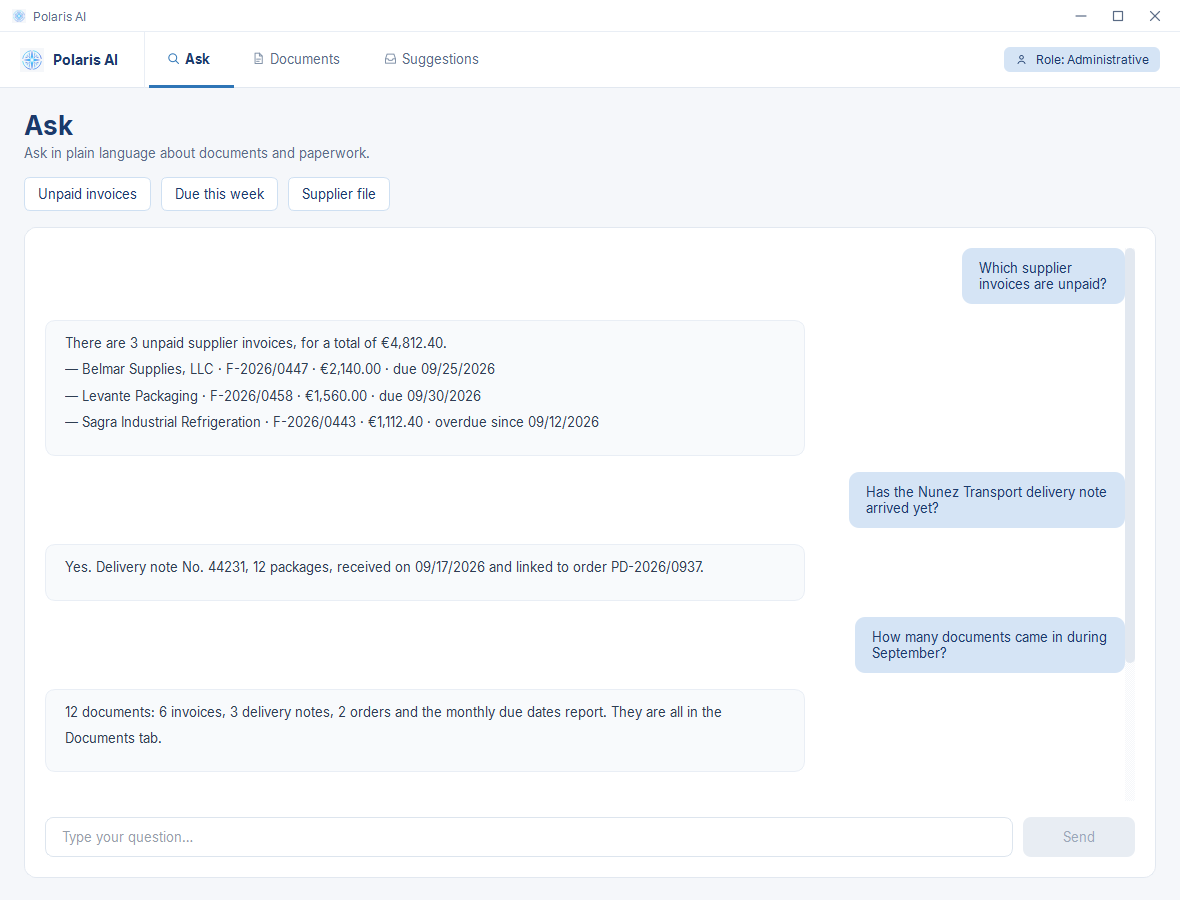
Everything that does not fit on the home page, organized by what you want to know. Pick a topic: each one opens its own panel.
The product’s own screens, with sample data, translated for this page: the product interface is currently in Spanish.
No fields to fill in, no need to learn where everything lives. Type the question and Polaris answers with what is in the documents it has classified.
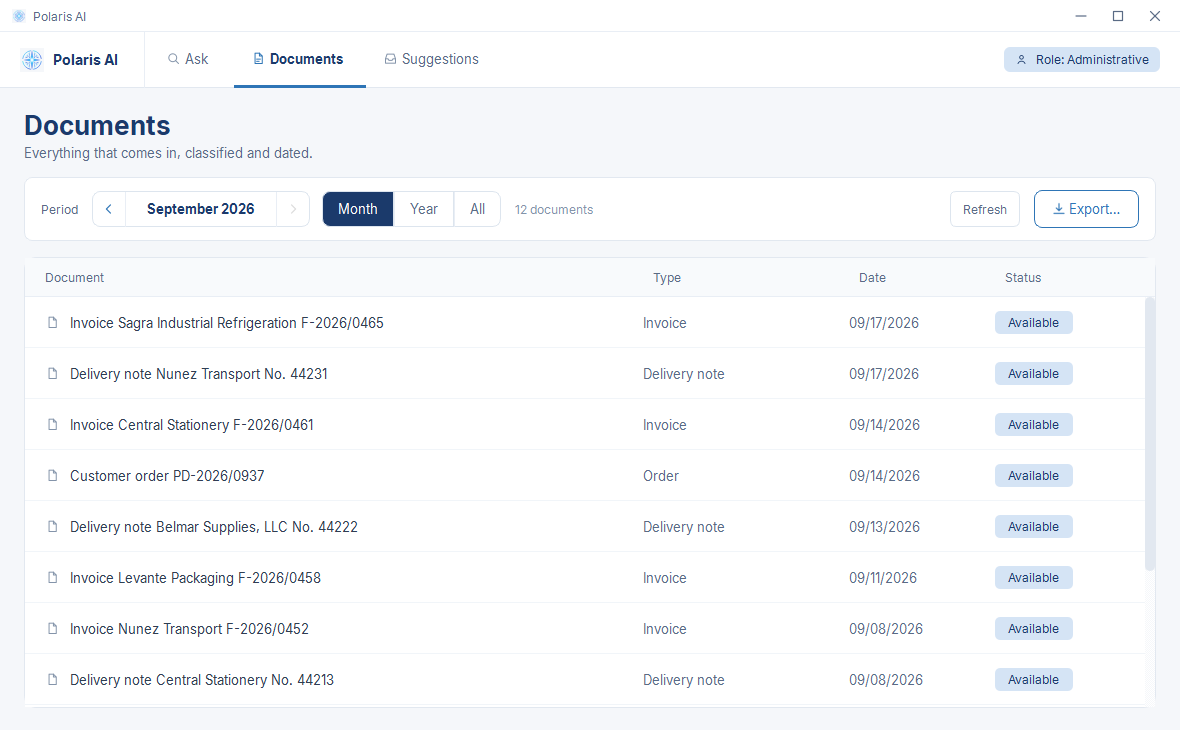
Whether it arrives by email or as a photo: it is detected, classified, and filed with its date. And it goes out to Excel or PDF for your accountant in one click.
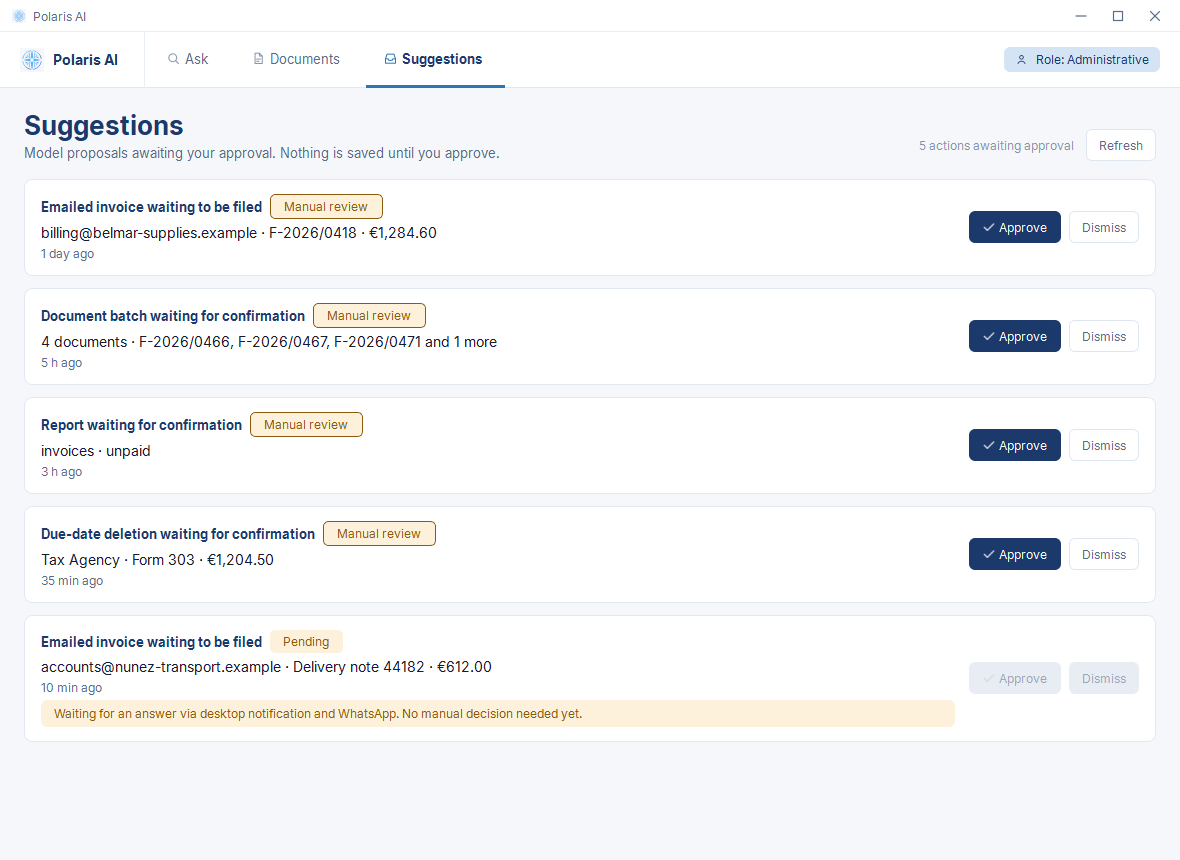
Five proposals awaiting approval; each one states which document it acts on. Four are waiting for manual review, with Approve and Dismiss buttons. The fifth is waiting for an answer on the desktop notification and on WhatsApp: its buttons are grayed out and the card says no manual decision is needed yet. The WhatsApp answer has been demonstrated in a test environment.
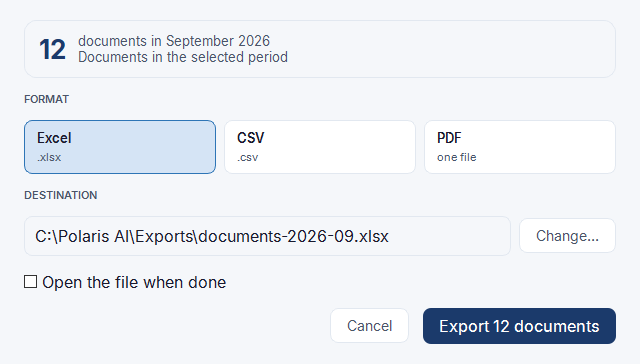
The quarter goes out in Excel, CSV, or PDF without searching for anything again, because it was already classified the moment it came in.
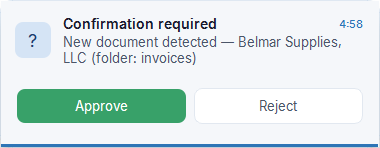
When a new document comes in, Polaris notifies you on the desktop and waits. Approving or rejecting is one click. If no one answers in time, the notice reaches you on WhatsApp: that part has been demonstrated in a test environment.
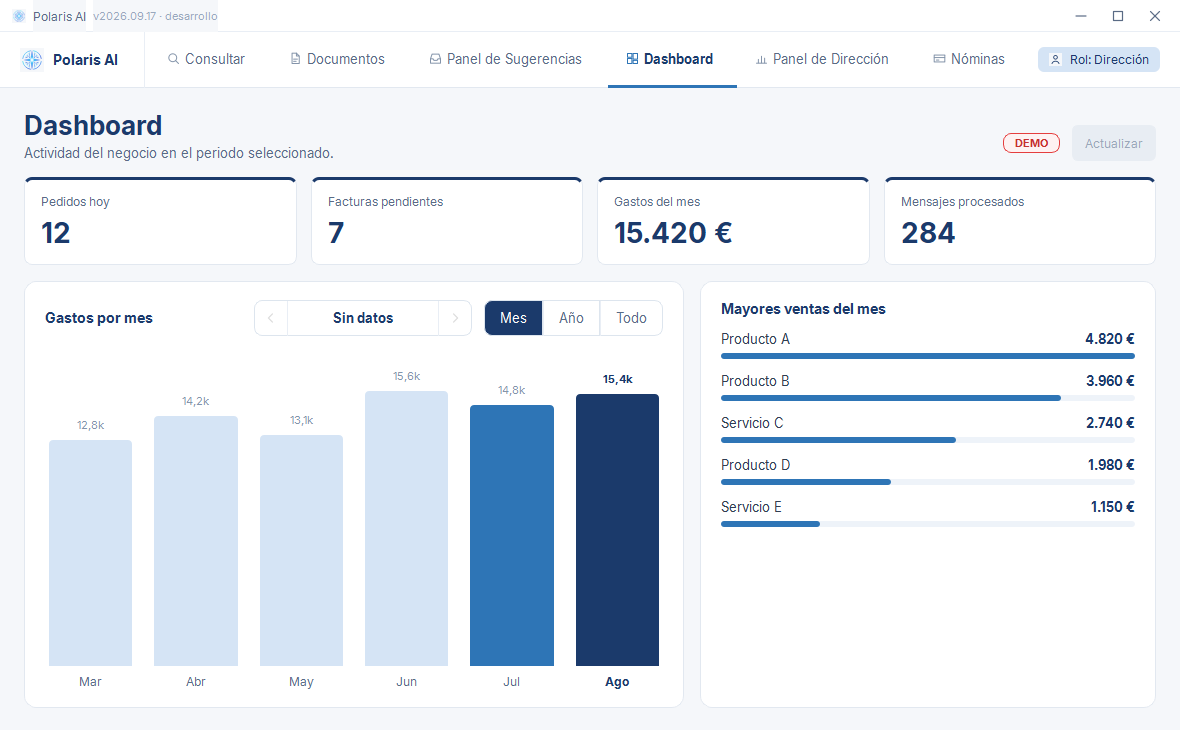
The Management role dashboard: today’s orders, pending invoices, monthly spend, and messages processed, with a chart of spending by month and the month’s top sales. The screen carries the DEMO mark.
For the actions configured for approval, approval is a step in the process: Polaris leaves the work ready and waits for a person to say yes.
Polaris is installed on your infrastructure, connects to the tools you already use, and works on whatever comes in.
Business email, through your own Google Workspace, and photos of receipts. Documents arrive the way they already arrive today.
The model, on your server, reads what each document is — invoice, delivery note, order — who it is from, and when. It files it with its date and detects duplicates.
Actions configured for approval are held: a desktop notification and, if no one answers in time, a WhatsApp message (demonstrated in a test environment). Afterwards, what has been classified can be queried in plain language and exported to Excel, CSV, or PDF.
A compute unit installed on your servers, connected to the tools you already use. Everything that comes in is classified on-premise — documents are not sent to an external AI provider — and actions configured for approval wait for a person to say yes.
Polaris AI is an agentic AI platform installed on your company’s own infrastructure, working over your documentation and your processes. The model runs on your server; the connections that go out are listed by name in the privacy panel.
Your documents are not sent to an external AI provider: the model runs on your server. No copies in someone else’s data centers to analyze them. Designed to help you comply with GDPR and for professions bound by confidentiality.
The cost model is explained on the call, with your case in front of us. We do not publish prices on the website.
It works over your company’s documents: every answer comes from what is in them, in your own vocabulary. No public models are trained on your data.
Four labels, with no mixing, and a single definition for each one: it applies across the whole website. The hours are estimates based on a real case.
Email is read automatically, and invoices and delivery notes are recognized with their supplier, number, and date. A photo of a receipt is classified on its own. Duplicates are detected.
Everything is classified and dated from the moment it comes in, so the quarter goes out filtered and exported to Excel, CSV, or PDF without searching for it again.
Documents go out the same way as the quarter. Revenue does not: no sales source is connected. Payroll is listed, but without amounts and without export.
Looking up an expense and finding an invoice, yes: you ask the way you speak, from the desktop. Checking a due date, not yet.
Asking over WhatsApp about the data that lives on the company’s server, with role-based access and limits: each role reaches only what concerns it.
For the Management role: queries about documents, reports, and emails; WhatsApp confirmations when the desktop notification is not approved in time; and automatic status reports.
Status reports that arrive on their own over WhatsApp, without having to ask for them.
Built. They were not adopted in the first deployment.
Downloading every payment received, posting it to the books, and categorizing it by service. It is the same work as organizing invoices, with a different entry point. It is built; today no sales source is connected.
Detecting them in email and sending a warning before they pass, with an entry in the calendar. It is built and currently paused.
Asking about the business in plain language from the Management panel, for the Management role only. The screen exists; the query feature is pending activation.
A customer asks about a service or a price and Polaris answers. Built and shelved: a customer-facing chatbot was not wanted.
Asking in plain language about the entire archive, beyond the prepared documents and queries, is the improvement with the greatest effect on what already exists.
An order comes in over WhatsApp and is recorded, without anyone typing it in.
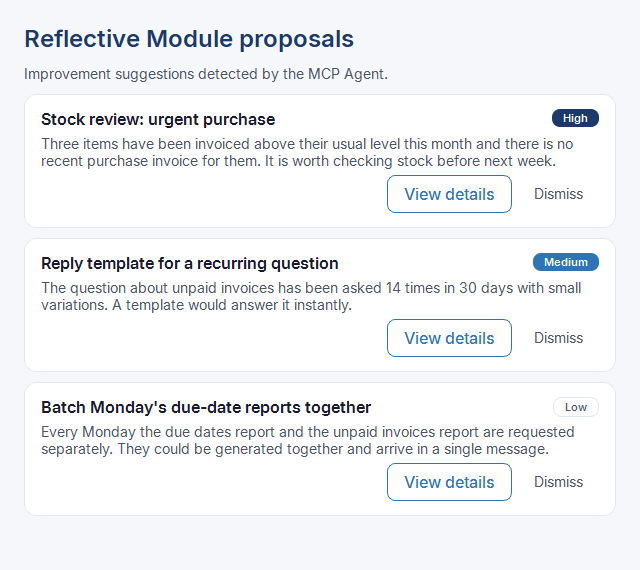
Polaris would watch how it is used and propose improvements: a purchase worth reviewing, a recurring question that deserves a template, two reports that could arrive together. It is a planned feature, not yet implemented.
The information they need, on their phone, without calling the office. In a three-person business it is not needed; in a company with people in the field, it changes the whole calculation.
Polaris is under active development, and this is what is coming. If any of this is exactly what you need, tell us in the first conversation: what you ask for weighs on the order.
The conversation with Polaris over WhatsApp has been demonstrated in a test environment. Telegram would be the same work done a second time: same agent, same human approval, another door. For those who prefer not to mix business with their personal number.
Today Polaris distinguishes between management and administration: each sees only what belongs to them. The next role is the sales rep: checking an order or a client file from the field, with no access to anything beyond their remit.
You drop documents into a folder on your computer and Polaris picks them up, classifies them, and files them without anyone pressing a button. The component exists and is paused on purpose: we are still cataloging how many different ways the same document can arrive before we let it loose on yours.
A3, Sage, Odoo, or whichever you use. Today Polaris leaves the work ready for your accountant in Excel, CSV, or PDF; the next step is for it to flow directly into the system where you already keep it.
This is how the window where Polaris would propose improvements could look, each one with its priority, to accept or dismiss. The feature is not implemented: this image is a mock-up.
What runs on your server, what leaves it, and what a person decides. Named explicitly, with no absolute promises.
Copilot and ChatGPT are good tools. The difference lies in where your documents are processed, who the service depends on, and how you pay. We describe it without figures: third-party prices change and we do not publish them.
| Polaris AI | Cloud tools (Copilot, ChatGPT) | |
|---|---|---|
| Where the model runs | On the company’s own server | On the provider’s servers |
| What leaves the company | Only the connections the company configures: its Google Workspace (OAuth2, minimum permissions) and WhatsApp through Meta’s Cloud API (demonstrated in a test environment) | The content sent to the service |
| Provider commitments | Not applicable: no AI provider processes the documents | The major providers state that they do not train on business data by default and offer data residency in the EU or by region |
| Where the difference lies | Processing happens on the company’s infrastructure | Processing happens on a third party’s infrastructure, under that third party’s contractual guarantees |
Polaris AI runs the model on your server. In the cloud, the provider processes your documents on its servers, under the guarantees it offers. Choosing one or the other is deciding who handles your information.
| Polaris AI | Cloud tools (Copilot, ChatGPT) | |
|---|---|---|
| To work | The model does not depend on the provider or on an internet connection. The connections to email and to WhatsApp do need internet | The service needs a connection to the provider |
| Terms and availability | The model is installed on the company’s server: it does not change because a provider changes | Set by the provider and subject to change: it publishes plans and options that evolve, and sometimes promotional offers priced differently from the usual rate |
With a cloud service, its availability, terms, and prices are decided by the provider. With Polaris, the model lives on your server.
| Polaris AI | Cloud tools (Copilot, ChatGPT) | |
|---|---|---|
| How it is purchased | The cost model is explained on the call | Per user and, depending on the product, by usage or by credits. Copilot Studio (agents) is billed by credits, with packs or pay-as-you-go, and requires an Azure subscription. ChatGPT Enterprise offers credit-based or usage-based options with custom pricing |
| What spending depends on | Explained on the call, with your case | On how many users and how much usage; it can vary from month to month and with changes in terms |
In the cloud, spending follows the number of users and the usage, and it can change with the provider’s terms. The Polaris cost model is explained on the call.
Third-party products change. If anything here is no longer accurate, write to us and we will correct it.
If your question is not answered here, email us at contacto@polaris-ai.es or call us at +34 602 02 58 77.